Workflow automation relies on software to complete and carry out repetitive tasks. This relies on data and consistent processes to drive productivity without constant human intervention. To put things into perspective, this isn’t anything new
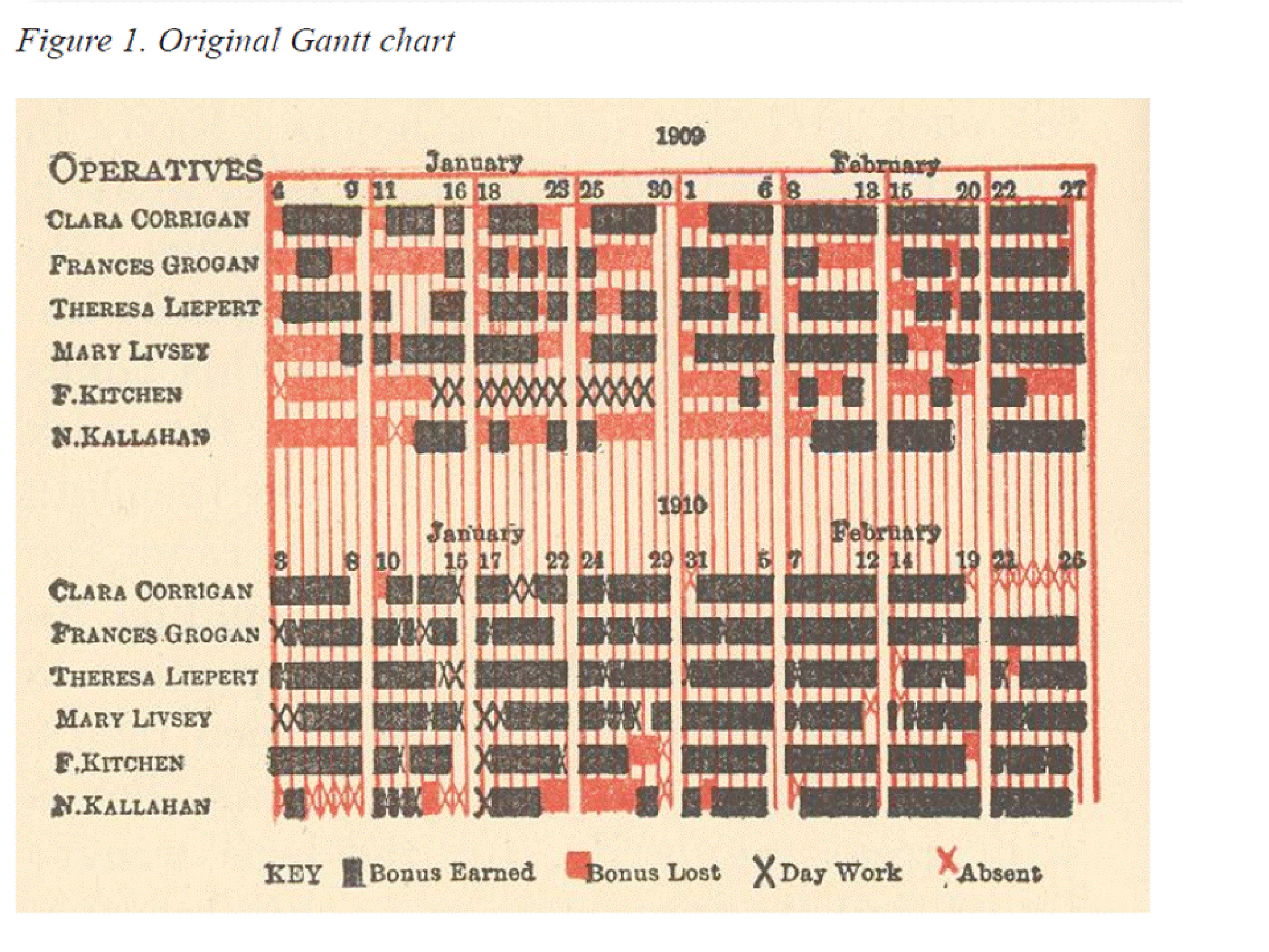
This is a Gantt Chart. It is one of the earliest breakthroughs in workflow automation. Henry Gantt, an engineer, created this tool in the early 1900s to illustrate project schedules and the correlation between productive activities and time.
Today, this basic tool has come a long way. From hands-on production-based industries to SaaS, every business model is capable of adopting automation. It reduces the margin for error, decision-based bottlenecks, and the overall overhead.
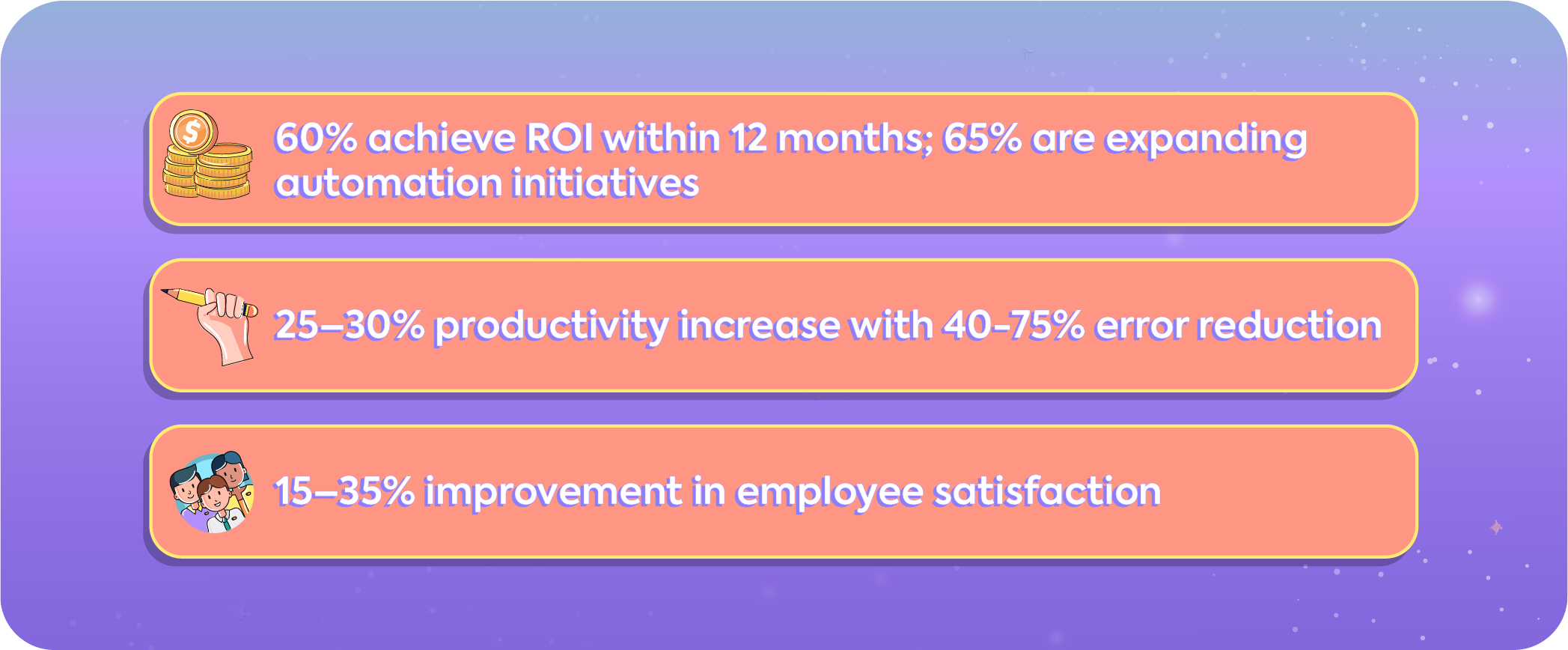
While the statistics are impressive, it’s crucial to note that workflow automation is an evolving discipline. With AI advancements, machine learning, and integration capabilities at its core, workflow automation may look very different in just a few years.
That said, the foundation of the system remains the same. For an in-depth look into agentic workflows, take a look at Agentic Workflows: Scaling Creative Teams with AI. You will also find a complete toolkit you can use for your business.
What Does Workflow Automation Mean Today?
Workflow automation is the use of software to execute a sequence of tasks, decisions, and approvals with minimal human intervention. A workflow typically includes:
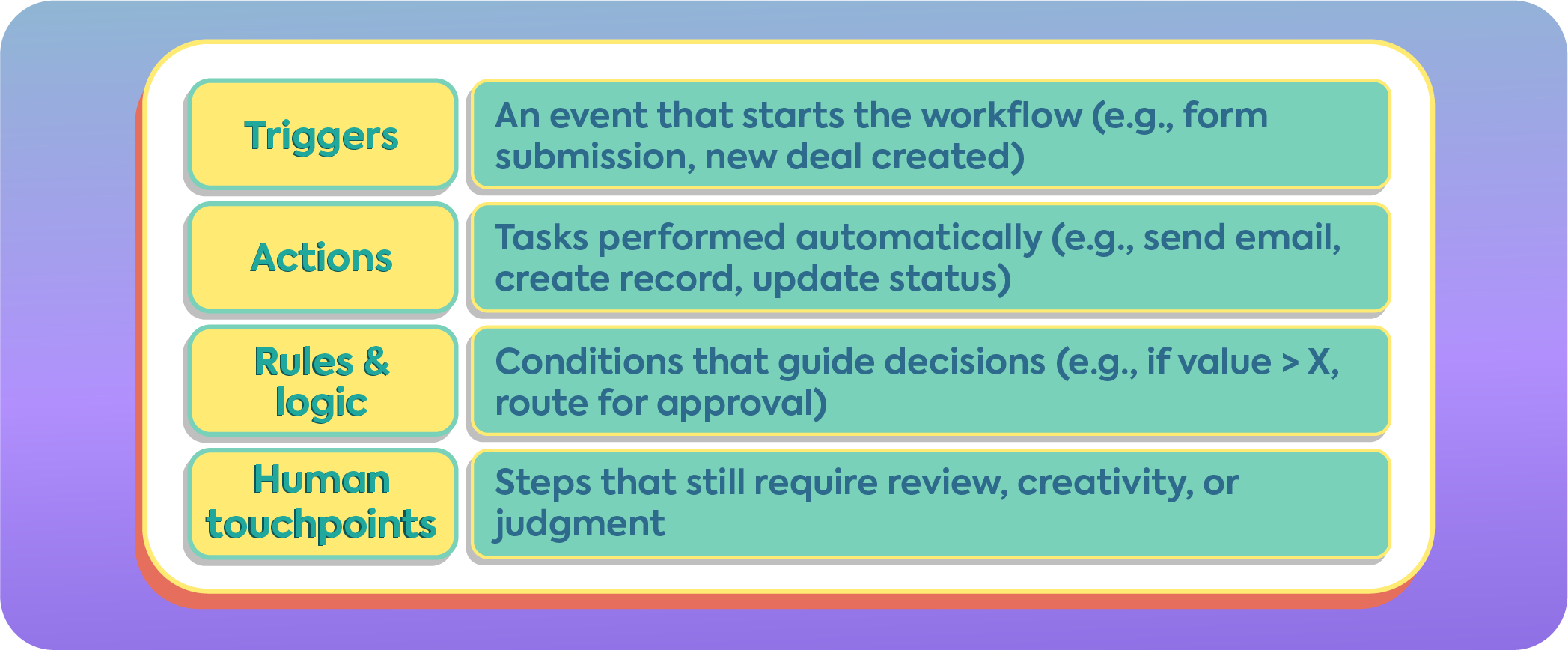
Automation doesn’t remove humans from the process; it removes unnecessary busywork, allowing humans to focus on high-value decisions and creative thinking.
Why Workflow Automation Matters Now More Than Ever
At Iris Creatives, we see workflow automation not as an operational upgrade, but as a creative enabler. As brands scale, complexity creeps in: more tools, more stakeholders, more approvals.
The result? Talented teams spend their time managing work instead of doing meaningful work.
Industry research consistently shows that a large share of knowledge‑worker time is lost to repetitive coordination tasks rather than high‑value thinking. Workflow automation exists to rebalance that equation. It removes friction from execution so strategy, creativity, and decision‑making can take center stage.
This shift isn’t about replacing people. It’s about redesigning how work flows so humans do what they do best, and systems handle the rest. Leading brands such as Zapier, HubSpot, and Webflow have adopted automation to scale operations and improve processes exponentially.

Industry: SaaS (Workflow Automation)
Challenge: Scaling a fully remote company while maintaining speed, clarity, and operational consistency
The Problem
Zapier has operated as a remote‑first company since its early days. As the team scaled globally, coordination became the core challenge, not productivity. Hundreds of employees across time zones needed reliable ways to move work forward without meetings, manual follow‑ups, or constant context switching.
The Workflow Automation Strategy
Zapier turned its own product inward, using automation as a foundational operating system for the business:
- Automated hiring workflows that route candidates through screening, interviews, and offers
- Asynchronous onboarding workflows triggered by new‑hire events
- Internal request systems for IT, finance, and operations with automated approvals
- Automated documentation updates and knowledge‑base notifications
- Cross‑tool automation connecting Slack, Google Workspace, GitHub, and internal databases
Tools & Stack
- Zapier (core automation layer)
- Slack (async communication + alerts)
- Google Workspace
- Notion (documentation & process knowledge)
- GitHub and internal tools
Results
- Reduced operational overhead despite team growth
- Faster internal response times without synchronous communication
- Strong process consistency across regions and functions
- A scalable remote culture supported by systems, not managers
Zapier demonstrates that workflow automation is not just a productivity tactic; it’s an organizational design choice. By automating coordination, the company enabled autonomy, focus, and speed at scale.

Workflow Automation Lifecycle

1.1 Audit Existing Workflows
Document the current process in detail, including:
- Manual user inputs
- System-to-system communications
- Data transfers and transformations
- Decision points and branching paths
- Exceptions and failure scenarios
- Hand-offs between people or tools
Create a process map that clearly defines triggers, decision logic, and outcomes. This serves as the blueprint for automation.
1.2 Select Suitable Processes
Prioritize processes that:
- Occur frequently
- Follow clear, rule-based logic
- Require minimal subjective judgment
- Are prone to manual errors
These characteristics make processes suitable for deterministic automation.

2.1 Triggers
Common trigger types include:
- Creation or updates of database records
- Form submissions or webhook events
- Scheduled executions (cron-based)
- File uploads or directory changes
- Messages from queues or event streams
Triggers should be clearly defined, observable, and idempotent where possible.
2.2 Conditions
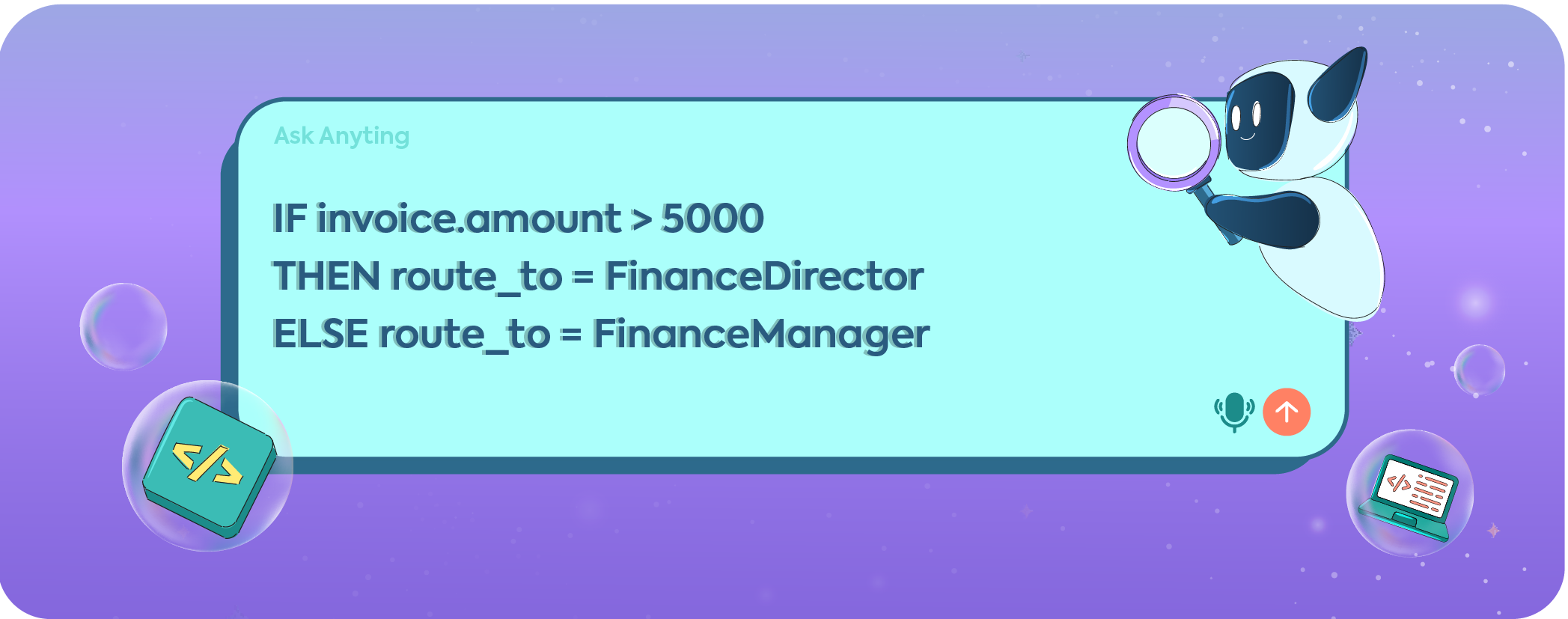
Define conditional logic using Boolean expressions to evaluate workflow paths:
- Threshold checks
- Status validations
- Multi-branch decision logic
2.3 Actions
Actions define the system response and may include:
- Sending notifications or emails
- Updating records in databases
- Invoking APIs or webhooks
- Creating, approving, or escalating tasks
- Writing logs or analytics events

3.1 Platform Types
Choose a platform based on workflow complexity and scale:
- No-code / Low-code platforms
Examples: Zapier, Make, Microsoft Power Automate
Best for simple, event-driven workflows - Workflow engines and orchestrators
Examples: Camunda, Apache Airflow
Best for complex logic, dependencies, or data pipelines - Custom automation and orchestration
Examples: Python scripts, GitHub Actions, AWS Step Functions
Best for maximum flexibility and control
3.2 Integration Readiness
Confirm that the platform supports required integrations, including:
- APIs and authentication methods
- Databases and file systems
- Message queues or event brokers
- Rate limits and schema compatibility
3.3 Environment and Governance
- Separate development, staging, and production environments
- Version control for workflow definitions
- Secure credential and secret management

4.1 Workflow Construction
Build workflows using:
- Visual builders (drag-and-drop components), or
- Code-defined DAGs (Directed Acyclic Graphs)
Ensure dependencies and execution order are explicit.
4.2 Step Configuration
For each step, define:
- Trigger parameters
- Conditional logic
- Action endpoints and payloads
- Retry and timeout policies
4.3 Data Handling
Implement required data processing, such as:
- Validation and parsing
- Normalization
- Enrichment using external sources
4.4 Error Handling and Reliability
Define fallback behavior:
- Failure notifications
- Retry mechanisms
- Escalation to human operators for undefined cases
4.5 Logging and Observability
Ensure each step produces logs and metrics for:
- Debugging
- Monitoring
- Long-term optimization
For high-scale systems, implement queueing and idempotency controls.

- Unit testing for individual triggers, conditions, and actions
- Integration testing for cross-system workflows
- End-to-end testing using representative data
- Performance testing for throughput and latency

- Deploy first to a staging environment
- Validate using real-world scenarios
- Promote to production with monitoring enabled
- Maintain rollback procedures for rapid recovery

- Track KPIs such as execution time, success rate, and throughput
- Identify bottlenecks and failure patterns
- Version workflows for auditability
- Keep platforms updated and documented

- Expand automation to additional processes
- Orchestrate workflows across multiple systems
- Introduce AI/ML for intelligent routing, prioritization, or classification where appropriate
Work With IRIS Your Workflow Automation Partner
Workflow automation is no longer “nice to have.” It is a foundational capability for modern organizations that want to scale without burning out their teams or introducing operational chaos. As we’ve seen, automation has evolved from early tools like Gantt charts into sophisticated systems that orchestrate people, data, and software across entire organizations.
But tools alone are not the solution. The real leverage comes from designing workflows intentionally, understanding where automation creates clarity, where humans must stay in control, and how systems should evolve as the business grows. Poorly designed automation can just as easily lock in inefficiencies as eliminate them.
This is where having the right partner matters. At Iris Creatives, workflow automation is approached as a strategic and creative discipline, not just a technical implementation. The focus is on building automation systems that:
- Reduce coordination overhead
- Preserve human judgment where it matters
- Scale cleanly as teams, tools, and complexity increase
- Integrate AI thoughtfully without sacrificing control or quality

The goal isn’t to automate everything. It’s to automate the right things, in the right way, so teams can spend more time thinking, creating, and making decisions that move the business forward.

- What types of workflows are best suited for automation?
Workflows that are repetitive, rule-based, and occur frequently are ideal candidates. Common examples include approvals, data syncing between tools, onboarding processes, reporting, and internal requests. Tasks that require heavy subjective judgment or creativity usually benefit from partial automation with human review.
- Will workflow automation eliminate jobs or reduce the need for people?
No. Effective workflow automation removes busywork, not people. It shifts human effort away from coordination, manual updates, and repetitive actions, allowing teams to focus on strategy, creativity, problem-solving, and decision-making.
- How long does it take to see ROI from workflow automation?
Many organizations see measurable ROI within 6–12 months. Gains typically come from reduced errors, faster cycle times, lower operational overhead, and improved employee satisfaction. The timeline depends on process complexity and how well workflows are designed.
- Do we need AI to start automating workflows?
Not at all. Most automation foundations are deterministic and rule-based. AI becomes valuable once workflows are stable and you want to introduce intelligent routing, classification, prioritization, or content generation. Starting simple is often the smartest path.
- How can Iris Creatives help with workflow automation?
Iris Creatives partners with teams to design, build, and scale workflow automation systems, from process audits and tool selection to implementation, governance, and AI-assisted workflows. Instead of selling tools, Iris focuses on creating systems that fit how your team actually works, today and as you grow.
If you’re looking for a long-term partner to simplify operations and unlock smarter ways of working, Iris Creatives offers tailored automation plans built around your business goals.